
Running a business today means being available whenever customers have questions. Whether someone wants to know your opening hours, ask about pricing, or check if a product is in stock, they expect quick answers. If they don’t get one, they often move on to another business.
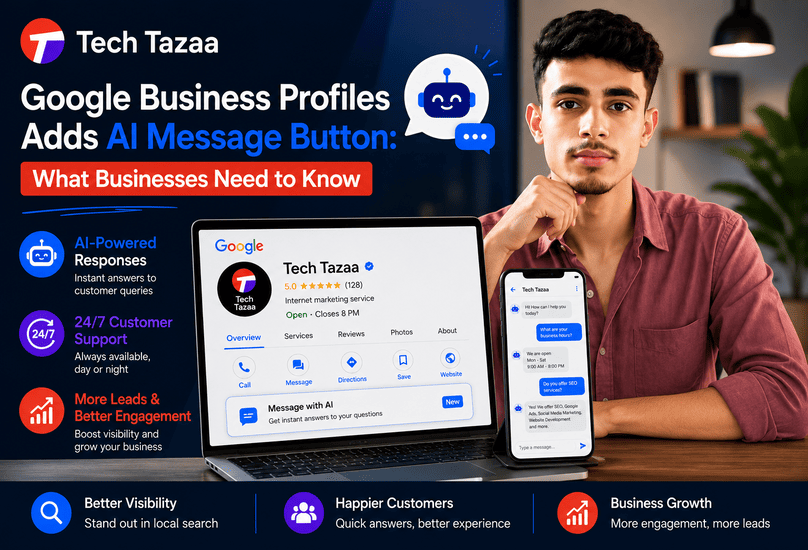
To solve this problem, Google has introduced a new AI Message Button for Google Business Profiles. This feature uses artificial intelligence to answer customer questions directly from your Business Profile, helping businesses provide faster responses even outside working hours.
The update is another sign that Google is investing heavily in AI-powered customer interactions. Instead of treating your Google Business Profile as just a listing, Google is turning it into a smart communication channel that can answer common questions, qualify potential customers, and improve the overall search experience.
For local businesses, this could become one of the most useful additions to Google Business Profile in recent years.
In this guide, you’ll learn what the Google Business Profiles AI Message Button is, how it works, who can use it, and why it matters for your business and local SEO strategy.
What Is the Google Business Profiles AI Message Button?
The Google Business Profiles AI Message Button is an AI-powered messaging feature that allows customers to start a conversation with your business directly from your Google Business Profile.
Instead of waiting for a staff member to reply, Google’s AI can answer routine questions instantly using information already available in your Business Profile. These responses may include:
- Business hours
- Store location
- Contact information
- Services offered
- Appointment availability
- Frequently asked questions
- Product or service details
The goal isn’t to replace your customer support team. Instead, it helps handle repetitive questions so your staff can focus on conversations that need personal attention.
For example, if someone searches for a local dentist and asks, “Are you open on Saturday?”, the AI can answer immediately if your business hours are correctly listed.
Likewise, a restaurant customer might ask whether reservations are required, or a salon visitor may want to know if walk-ins are accepted. These are simple questions that AI can often answer within seconds.
This creates a smoother experience for both businesses and customers.
Why Did Google Introduce This Feature?
Google’s mission has always been to help people find accurate information as quickly as possible.
As AI becomes a bigger part of Google Search, Maps, and Business Profiles, adding an AI messaging assistant is a natural next step.
Many small businesses struggle to respond to customer inquiries promptly because they have limited staff or receive messages outside business hours.
By introducing AI messaging, Google aims to:
- Reduce response times
- Improve customer satisfaction
- Help businesses capture more leads
- Make local search results more useful
- Encourage businesses to keep their profiles updated
The more complete and accurate your Google Business Profile is, the better the AI can answer customer questions.
How Is It Different from Traditional Business Messaging?
Traditional messaging relies on someone from your team checking notifications and replying manually.
The AI Message Button changes that process.
Instead of waiting for a response, customers receive instant answers to common questions. If the AI cannot answer accurately or the conversation becomes more specific, it can direct the customer toward speaking with a real person.
Here’s a quick comparison:
Traditional Messaging | AI Message Button |
Manual replies | Automated AI responses |
Limited by business hours | Available 24/7 |
Slower response times | Instant answers for common questions |
Staff handles every message | AI manages repetitive inquiries |
Higher workload | Reduced workload for business owners |
Businesses still remain in control, but AI helps reduce the number of routine conversations that require human involvement.
Who Can Use the Google Business Profiles AI Message Button?
Google is gradually introducing AI-powered features across different products, and the AI Message Button is expected to roll out in phases.
Availability may depend on factors such as:
- Country or region
- Business category
- Language support
- Eligibility requirements
- Google account settings
Businesses with an active and verified Google Business Profile are generally in the best position to receive new features as they become available.
If you haven’t claimed or verified your profile yet, this is a good time to do so. A complete profile with accurate business information increases the chances of making full use of future AI features.
Which Businesses Will Benefit the Most?
Almost every customer-facing business can benefit from AI messaging, but some industries are likely to see stronger results because they receive a high volume of repetitive questions.
Examples include:
Restaurants
Customers frequently ask about opening hours, menu items, reservations, parking, or delivery options.
Healthcare Clinics
Patients often inquire about appointments, consultation fees, clinic timings, insurance acceptance, or available specialists.
Home Service Businesses
Electricians, plumbers, HVAC companies, and cleaning services regularly receive questions about service areas, pricing, and emergency availability.
Retail Stores
Shoppers commonly ask whether products are in stock, what payment methods are accepted, or whether home delivery is available.
Hotels and Hospitality
Guests often need quick answers about check-in times, room availability, amenities, parking, or nearby attractions.
Businesses that receive dozens of similar questions each day stand to save the most time by using AI-assisted messaging.
How the AI Message Button Works
While Google’s AI does not replace your team, it acts as the first point of contact for many customer interactions.
The system uses information from your Google Business Profile to generate relevant responses.
A typical customer journey looks like this:
- A customer finds your business through Google Search or Google Maps.
- They tap the AI Message Button.
- They ask a question using natural language.
- Google’s AI analyzes the query.
- The AI provides an answer using your business information.
- If the request requires human assistance, the conversation can move to your team.
The quality of these responses depends heavily on how complete and accurate your Business Profile is.
If your business hours, services, descriptions, phone number, website, or FAQs are outdated, the AI may not provide the best possible answers.
For that reason, maintaining your Google Business Profile is no longer just a local SEO task. It also plays a direct role in how effectively AI communicates with your potential customers.
Benefits of Google Business Profile AI Messaging
The introduction of AI messaging is more than just another Google update. It changes how businesses interact with potential customers at the exact moment they are ready to make a decision.
Whether you run a local restaurant, a dental clinic, a law firm, or an eCommerce store with a physical location, faster communication can translate into more inquiries and, ultimately, more customers.
Let’s look at the biggest advantages of the Google Business Profiles AI Message Button.
Faster Customer Responses
Speed matters in customer service.
Studies consistently show that customers are more likely to contact a competitor if they don’t receive a quick response. Waiting hours, or even minutes, can sometimes be enough to lose a potential sale.
With AI-powered messaging, common questions can be answered almost instantly.
Instead of making customers wait for someone to check notifications, the AI provides immediate responses using information from your Google Business Profile.
For example, customers can quickly ask:
- What time do you open?
- Are you open today?
- Do you offer free parking?
- Can I book an appointment?
- Do you provide home delivery?
- What services do you offer?
Receiving an immediate answer creates a better first impression and keeps customers engaged.
24/7 Customer Availability
Most small businesses cannot afford to provide round-the-clock customer support.
However, customers often search for businesses during evenings, weekends, or holidays.
Imagine someone looking for an emergency plumber at midnight or searching for a nearby hotel after a late flight. They may have several questions before deciding whom to contact.
The AI Message Button helps bridge this gap by responding even when your staff is unavailable.
While it may not answer every complex question, it can still provide useful information that helps customers move closer to making a decision.
Better Customer Experience
Customers value convenience.
They don’t always want to call a business for simple questions.
Many people prefer sending a quick message because it feels less intrusive and takes only a few seconds.
AI messaging supports this behavior by making conversations easier and faster.
Instead of browsing through multiple pages on your website, customers can simply ask a question and receive an answer immediately.
This creates a smoother buying experience and reduces friction during the decision-making process.
More Qualified Leads
Not every customer inquiry leads to a sale.
Many conversations involve basic questions that help customers determine whether your business is the right fit.
By answering these questions quickly, AI helps qualify potential leads before they reach your sales team.
For example:
- A patient can confirm whether a clinic accepts their insurance.
- A customer can check whether same-day delivery is available.
- A restaurant visitor can verify if reservations are required.
- A home service company can confirm whether it serves a specific area.
When customers already have this information, they are more likely to contact your business with serious purchase intent.
Reduced Workload for Business Owners
Many business owners spend a surprising amount of time answering the same questions every day.
Examples include:
- Business hours
- Pricing information
- Appointment availability
- Accepted payment methods
- Directions
- Contact details
Instead of repeating these answers dozens of times, AI can handle routine conversations automatically.
This allows employees to focus on tasks that require personal attention, such as consultations, customer support, or closing sales.
For small businesses with limited staff, this can be a significant time saver.
Increased Local Engagement
Google wants users to interact directly with businesses inside its ecosystem.
Features like reviews, Q&A, booking buttons, and messaging encourage customers to stay on Google rather than visiting multiple websites.
The AI Message Button builds on this approach by making communication more interactive.
Businesses that respond quickly and provide accurate information often create a better overall customer experience, which may lead to stronger engagement with their Google Business Profile.
How to Enable the AI Message Button
If the feature is available for your business, setting it up is straightforward.
Although the exact interface may change as Google expands the rollout, the general process remains similar.
Step 1: Sign In to Google Business Profile
Log in using the Google account that manages your Business Profile.
Ensure your profile is verified and contains accurate information.
Step 2: Enable Business Messaging
Navigate to your Business Profile settings and check whether messaging is available.
If messaging is disabled, turn it on before accessing AI-powered features.
Step 3: Activate AI Features
If Google has enabled AI messaging for your account, you’ll see options related to AI-generated responses or conversational assistance.
Review the available settings before activation.
Step 4: Review Your Business Information
AI depends on accurate information.
Before enabling the feature, verify that your profile includes:
- Business name
- Phone number
- Website
- Business hours
- Services
- Categories
- Address
- Business description
- Frequently asked questions
The more complete your profile, the more accurate the AI responses are likely to be.
Step 5: Test the Experience
Once enabled, send a few test messages.
Ask questions that customers commonly ask, such as:
- What time do you open?
- Do you offer appointments?
- Where are you located?
- Is parking available?
- What services do you provide?
Testing helps you identify gaps in your Business Profile before customers encounter them.
Best Practices for Using Google Business Profile AI
AI is only as effective as the information it receives.
Following a few simple practices can improve the quality of automated conversations.
Keep Your Business Information Accurate
This is the most important step.
Review your profile regularly to ensure your:
- Business hours
- Holiday hours
- Contact information
- Services
- Pricing (if applicable)
- Website link
- Address
are all up to date.
Outdated information can lead to incorrect AI responses and frustrated customers.
Write a Detailed Business Description
Your business description gives Google’s AI additional context.
Instead of writing a generic paragraph, explain:
- What your business offers
- Who your customers are
- Your specialties
- Unique selling points
- Service areas
A detailed description helps AI generate more relevant answers.
Build a Helpful FAQ Section
Think about the questions customers ask every day.
Examples include:
- Do you offer free consultations?
- Is parking available?
- What payment methods do you accept?
- Are appointments required?
- Do you offer same-day service?
Including these details in your profile helps the AI answer more confidently.
Review AI Conversations Regularly
Even though AI can automate responses, it should not be left unchecked.
Review conversations periodically to ensure:
- Answers remain accurate.
- Customers receive helpful information.
- No recurring issues are being overlooked.
Monitoring conversations also helps you identify new questions that should be added to your FAQs.
Combine AI with Human Support
AI should support your customer service, not replace it.
Some situations still require empathy, negotiation, or technical knowledge.
Examples include:
- Billing disputes
- Custom quotations
- Medical consultations
- Legal advice
- Complaint resolution
Customers should always have an easy way to speak with a real person when needed.
The most successful businesses will use AI to handle routine questions while allowing their team to focus on conversations where human expertise makes the biggest difference.
SEO Impact of the Google Business Profiles AI Message Button
One of the biggest questions business owners have is whether the AI Message Button can improve Google rankings.
The short answer is: not directly, but it can contribute to signals that support stronger local visibility.
Google has not announced that AI messaging is a ranking factor. However, the feature can influence customer engagement, profile completeness, and user experience, all of which play an important role in local search.
Let’s look at how.
Can AI Messaging Improve Local SEO?
Better Customer Engagement
Google wants users to find answers quickly.
When customers interact with your Google Business Profile through AI messaging, they spend more time engaging with your listing instead of leaving to search for another business.
While engagement alone isn’t a confirmed ranking signal, businesses that provide a better user experience often perform well over time.
More Complete Business Profiles
AI relies on accurate business information.
That means businesses have a strong reason to keep their profiles updated with:
- Business hours
- Contact details
- Services
- Photos
- Products
- FAQs
- Attributes
A well-maintained profile has always been a key part of local SEO.
The AI Message Button encourages businesses to keep this information current, which benefits both customers and search visibility.
Better Customer Experience
Customer experience has become increasingly important in local search.
When users receive quick, accurate answers, they are more likely to:
- Call your business
- Request directions
- Book appointments
- Visit your website
- Leave positive reviews
These actions signal that your Business Profile is useful and active.
Higher Conversion Opportunities
Imagine two businesses offering the same service.
One responds instantly using AI.
The other takes several hours to reply.
Most customers will choose the business that answers first.
Even if rankings stay the same, faster communication can improve conversion rates and help you generate more leads from the same amount of search traffic.
AI Messaging vs Traditional Business Messaging
The new AI Message Button doesn’t eliminate the need for human conversations. Instead, it changes how businesses handle routine inquiries.
Here’s how the two approaches compare.
Feature | AI Message Button | Traditional Message |
Response Time | Instant for common questions | Depends on staff availability |
Availability | 24/7 | Business hours or when staff respond |
Scalability | Handles multiple conversations simultaneously | Limited by team size |
Cost | No additional customer support staff required | Higher staffing costs |
Personalization | Good for standard questions | Better for complex discussions |
Human Interaction | Available when needed | Required for every conversation |
Customer Experience | Faster first response | More personalized responses |
The best approach is to combine both.
Let AI answer repetitive questions while your team handles situations that require judgment, empathy, or detailed explanations.
Industries That Can Benefit the Most
Although almost every business can use AI messaging, some industries are likely to see greater value because customers ask similar questions every day.
Restaurants and Cafés
Restaurants receive a constant flow of questions about:
- Opening hours
- Reservations
- Menu availability
- Home delivery
- Parking
- Outdoor seating
AI can answer these questions within seconds, allowing staff to focus on serving customers.
Healthcare Clinics
Medical practices often receive repetitive inquiries about:
- Appointment availability
- Consultation fees
- Insurance acceptance
- Doctor schedules
- Clinic timings
AI can provide basic information while ensuring patients contact staff for medical advice or emergencies.
Real Estate Agencies
Home buyers and renters frequently ask about:
- Property availability
- Office hours
- Appointment scheduling
- Service locations
- Agent contact details
Quick responses can increase the chances of converting interested buyers into qualified leads.
Home Service Businesses
Electricians, plumbers, pest control companies, painters, and cleaning services often answer identical questions throughout the day.
Examples include:
- Do you serve my area?
- Are emergency services available?
- What are your working hours?
- How can I book a visit?
AI reduces the time spent handling these routine inquiries.
Law Firms
Potential clients commonly ask about:
- Consultation availability
- Office location
- Practice areas
- Business hours
- Appointment booking
AI can answer administrative questions while lawyers focus on client consultations.
Retail Stores
Retail businesses can use AI messaging to answer questions about:
- Store timings
- Product availability
- Exchange policies
- Accepted payment methods
- Pickup options
Customers receive faster answers without waiting for a sales representative.
Automotive Businesses
Car dealerships and repair workshops frequently receive inquiries about:
- Service appointments
- Vehicle availability
- Maintenance packages
- Operating hours
- Warranty information
AI can simplify these conversations before a customer visits the showroom or service center.
Hotels and Hospitality
Hotels often answer questions regarding:
- Check-in and check-out times
- Room availability
- Amenities
- Parking
- Airport transfers
- Nearby attractions
Providing instant responses creates a smoother booking experience.
Tips to Get Better Results from AI Messaging
Simply enabling AI isn’t enough.
Businesses that maintain accurate information and review their profiles regularly are more likely to provide useful responses.
Here are some practical ways to improve AI performance.
Write a Better Business Description
Avoid vague descriptions.
Instead, explain:
- What your business does
- Who you serve
- Areas you cover
- Products or services offered
- What makes your business different
A detailed description gives Google’s AI more context when answering customer questions.
Create Helpful FAQs
Think like your customers.
What questions do they ask before making a purchase?
Include answers for topics such as:
- Pricing
- Booking process
- Delivery
- Returns
- Parking
- Accessibility
- Payment methods
The more useful information available, the more helpful AI becomes.
Keep Contact Information Updated
Double-check that your:
- Phone number
- Website
- Address
- Business hours
are always correct.
Even a small mistake can create confusion and reduce customer trust.
Continue Collecting Reviews
Although reviews don’t directly improve AI messaging, they strengthen your Google Business Profile.
Positive reviews build credibility and encourage more people to contact your business.
Replying to reviews also shows that your business is active and engaged.
Monitor Customer Questions
Pay attention to the questions customers ask repeatedly.
If you notice the same inquiries appearing often, update your profile or FAQ section so AI can provide more accurate answers.
Over time, this creates a better experience for future customers.
Looking Ahead: The Future of AI in Google Business Profiles
Google has made it clear that AI will play a larger role across Search, Maps, and Business Profiles.
The AI Message Button is likely just the beginning.
In the coming years, businesses may see features such as:
- AI-generated appointment scheduling
- Smarter booking recommendations
- Personalized product suggestions
- Voice-based conversations
- Automated follow-up messages
- AI-powered customer insights
- Better integration with Google Maps and Search
As these capabilities expand, maintaining an accurate and complete Google Business Profile will become even more important.
Businesses that adopt these tools early and keep their information updated will be better positioned to meet customer expectations and make the most of future AI-powered features.
Frequently Asked Questions (FAQs)
What is the Google Business Profiles AI Message Button?
The Google Business Profiles AI Message Button is an AI-powered messaging feature that allows customers to ask questions directly from your Google Business Profile. It uses your business information to provide instant responses to common inquiries like business hours, services, pricing, and location.
Is the AI Message Button free?
Google has introduced the feature as part of Google Business Profiles. Availability may vary depending on your country, business category, and rollout schedule. Check your Business Profile dashboard for the latest updates.
How do I enable AI messaging in Google Business Profile?
If the feature is available for your business:
- Sign in to your Google Business Profile.
- Open your Business Profile settings.
- Turn on Messaging.
- Enable AI-powered responses if the option is available.
- Review your business information before going live.
Keeping your profile complete helps the AI generate more accurate responses.
Can customers still talk to a real person?
Yes.
The AI Message Button is designed to answer routine questions. Customers can still be directed to a human representative when they need personalized assistance or have more complex requests.
Does AI messaging improve Local SEO?
There is no confirmation from Google that AI messaging is a direct ranking factor.
However, it can improve customer engagement, encourage businesses to maintain accurate Business Profiles, and create a better user experience. These factors can contribute to stronger local search performance over time.
Is the AI Message Button available for every business?
Not yet.
Google is rolling out AI features gradually. Availability depends on factors such as region, business type, language support, and account eligibility.
Can I disable AI responses?
If Google provides this option in your Business Profile settings, you can manage or disable AI-generated responses. Available controls may change as Google continues to update the feature.
Is customer data secure with Google AI messaging?
Google applies its existing security and privacy measures to Business Profile features. Businesses should also review Google’s policies regularly and avoid sharing sensitive customer information through automated conversations.
What questions can the AI answer?
The AI is designed to answer common customer questions, including:
- Business hours
- Address and directions
- Phone number
- Services offered
- Appointment availability
- Product information
- Payment methods
- Parking information
- Frequently asked questions
Questions requiring expert advice or business-specific decisions should still be handled by your team.
Will AI replace customer support staff?
No.
The AI Message Button is intended to support customer service by handling repetitive questions. Human interaction remains essential for sales discussions, complaint resolution, technical support, and personalized consultations.
Final Thoughts
The introduction of the Google Business Profiles AI Message Button marks another step in Google’s shift toward AI-powered search experiences.
Customers expect fast, accurate answers before deciding where to shop, book an appointment, or request a service. Businesses that can respond quickly are more likely to capture those opportunities.
While the AI Message Button won’t replace human conversations, it can reduce response times, improve customer satisfaction, and help your team focus on higher-value interactions.
The key to getting the most from this feature is maintaining a complete and up-to-date Google Business Profile. Accurate business hours, services, contact details, photos, and FAQs not only help customers but also give Google’s AI the information it needs to provide reliable answers.
As Google continues expanding AI across Search, Maps, and Business Profiles, businesses that adapt early will be better prepared for the future of local search.
If you haven’t reviewed your Google Business Profile recently, now is a great time to update it and prepare for the next generation of customer communication.
Ready to Use Google’s AI Message Button?
The AI Message Button is more than a new feature. It’s an opportunity to improve customer communication, respond faster, and create a better experience for people discovering your business on Google.
Review your Google Business Profile, update your business information, refresh your FAQs, and monitor new AI features as they become available.
The businesses that invest in accurate information today will be in a stronger position as Google’s AI capabilities continue to evolve.
Need Help Optimizing Your Google Business Profile?
At Tech Tazaa, we help businesses improve their Google Business Profile, Local SEO, Google Ads, website SEO, and digital marketing strategy. From higher Google Maps rankings to generating quality leads, our team helps you grow your online presence with data-driven solutions.
Ready to grow your business? Contact Tech Tazaa today and let’s get started.