
Family portraits have always been an integral part of celebrations in India. Families dress in traditional garb, visit the pandals, and create photos that will last a lifetime—these are very special memories. Durga Puja as one of the most colorful and emotionally significant celebrations is no exception. When you are busy with work and everyday life preparing for a professional photo shoot, having matching outfits, and finding the right festive setting are not always things you can accomplish.
That’s where Google Gemini photo editing for Durga Puja portraits comes in. Using tools from AI and machine learning, Google Gemini enables you to take ordinary photos to create stunning family portraits draped in traditional sarees and dhotis, along with festive jewelry and decoration, with just a simple prompt or two. Whether you want to impress your social media friends, create one-of-a-kind family albums, or digital invite your relatives and friends, the capabilities of Gemini AI can make it super easy.
In this blog, we will explain how Google Gemini photo editing works, why Durga Puja portraits are important culturally, and even share 5 simple AI prompts you can try today- to create your own family portrait.
What Is Google Gemini Photo Editing?
Google Gemini is an evolving suite of image and text, voice, and photo editing capabilities, not simply a conversational AI system. Traditional editing programs require the user to ‘manually’ make the edits, while Gemini draws on AI to understand the prompt and generate the edits in full.
For example, instead of spending hours adjusting colors, or fixing backgrounds in a photo, the user simply types:
“Transform this family photo into a Durga Puja pandal background with traditional attire.”
Within seconds, Gemini goes through the utility of the edits and applies them, saving time and energy.
Key Features for Portrait Editing:
- AI-Powered Outfits: Apply cultural attire like sarees, kurtas, or dhotis.
- Background Replacement: Switch plain settings to festive Durga Puja pandals.
- Lighting Adjustments: Add warm tones for a traditional festive glow.
- Group Photo Enhancements: Perfect for large family portraits.
Why Create Family Portraits in Durga Puja Looks?
Durga Puja transcends a festival—it is an emotion that connects families. Getting dressed in ethnic attire, going around the pandals, taking group pictures with family and friends, is a ritual no less important than praying.
Not the entire family is able to organize professional photo shoots and travel to all the decorated pandals. AI enhances family members photos, gives them a chance to recreate authentic festive styles.
Emotional & Cultural Value:
- Preserves memories of loved ones even if they live far away.
- Helps NRIs connect with their roots by creating digital festive portraits.
- Reinforces cultural traditions through attire and festive themes.
How to Use Google Gemini for Festive Photo Editing
If you’re new to AI photo editing, don’t worry—Google Gemini makes it simple. Here’s a quick step-by-step guide:
Step-by-Step Process:
- Upload Your Image: Start with a high-resolution photo of yourself, your family, or even a selfie.
- Enter Your Prompt: Be specific. For example, “Apply a red and white Bengali saree with a Durga Puja background.”
- Review the Output: Gemini generates multiple variations. Pick the one closest to your vision.
- Fine-Tune: Use manual editing options for minor tweaks like jewelry, lighting, or positioning.
- Save & Share: Export the portrait for printing, social media, or digital invites.
💡 Pro Tip: The more descriptive your prompts are, the more accurate and realistic the output will be.
5 Easy AI Prompts for Durga Puja Family Portraits
This is the section most readers are waiting for—the ready-to-use AI prompts that deliver instant festive portraits.
Prompt 1: Traditional Bengali Saree Look for Women
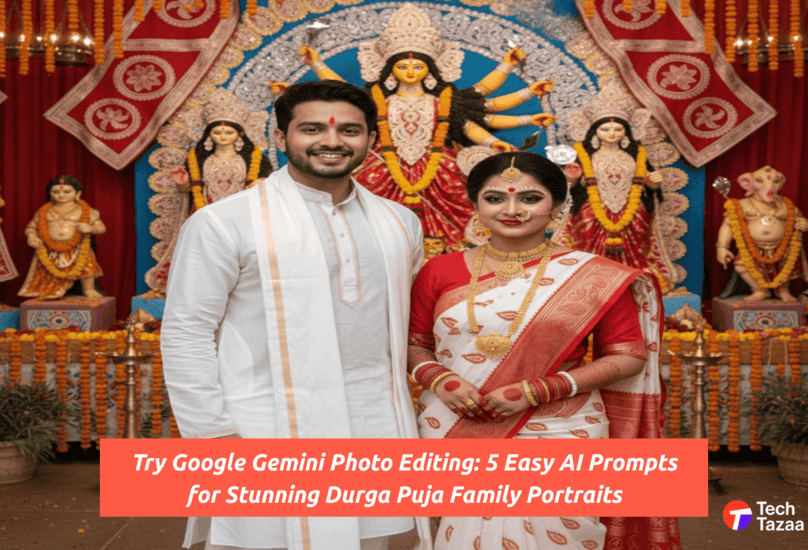
“Transform this photo into a Durga Puja look with a red and white Bengali saree, alta on hands, and festive gold jewelry.”
Prompt 2: Kurta-Pajama or Dhoti Look for Men
“Convert this image into a Durga Puja portrait with traditional white dhoti, kurta, and background of a decorated pandal.”
Prompt 3: Kids in Festive Outfits with Durga Puja Background
“Make this child wear a colorful lehenga/punjabi kurta and place them in front of a Durga idol with festive lighting.”
Prompt 4: Family Group Portrait in Pandal Decor
“Edit this group photo to look like a family posing in front of a Durga Puja pandal, with all members in traditional outfits.”
Prompt 5: Artistic Durga Puja-Themed Backdrops & Filters
“Add a creative Durga Puja background with dhak, lights, and shankha, styled like a professional festive shoot.”
These prompts are easy to customize—simply swap attire, colors, or backdrops to suit your preference.
Pro Tips to Make Your AI Portraits Look Realistic
While Gemini does the heavy lifting, a few tricks can take your portraits from good to stunning.
- Use High-Resolution Images: Clearer inputs = sharper edits.
- Add Manual Touch-Ups: Use free tools like Canva or Lightroom for small refinements.
- Stay Authentic: Research traditional attire and accessories for cultural accuracy.
- Leverage Lighting: Warm tones and soft shadows mimic real photography.
- Experiment with Variations: Run multiple prompts and combine the best outputs.
Best Use Cases for Durga Puja AI Portraits
These AI-generated portraits aren’t just for fun—they’re practical too.
- Social Media Sharing: Stand out on Instagram, Facebook, or WhatsApp groups with creative festive portraits.
- Digital Invites: Use edited family photos as Durga Puja gathering invitations.
- Personalized Albums: Create a digital scrapbook for your family’s festival memories.
- Corporate Greetings: Businesses can use festive AI portraits for employee campaigns.
FAQs on Google Gemini Photo Editing for Durga Puja Looks
1: Is Google Gemini photo editing free to use?
Yes, the basic version is free, but premium features may require a subscription.
2: Can I customize family outfits with AI prompts?
Absolutely! You can specify saree colors, jewelry styles, and even background themes.
3: How accurate are Durga Puja AI portraits?
Pretty accurate, though results may vary. Realism improves with high-quality inputs and detailed prompts.
4: Can AI edit group photos into festive backgrounds?
Yes, Gemini supports group editing and works well for family portraits.
5: Which is better: Gemini vs Photoshop for festive edits?
Gemini is faster and prompt-driven, while Photoshop allows manual precision. They complement each other well.
Conclusion: Bring Festive Magic to Your Family Portraits with Google Gemini
Durga Puja is about family, tradition, and celebration. This year, to capture the spirit of the festival, you will no longer have to contact professional studios or pay large sums for uplifted photo shoots, thanks to Google Gemini AI. The AI requires only a few prompts to create an authentic, culturally informative, and eye-catching portrait that captures your joy of the season.
So, this year, instead of taking fixed selfies photos, let’s elevate your family pictures to traditional Durga Puja portraits. You can try out the prompts, then share your creations on social media, and have fun making this festival unforgettable.
👉 Ready to experiment? Head over to Google Gemini and start editing your festive portraits today!